
diados
Extension of the Day

diados

5.0 FREE
  • Screenshot 1

Description

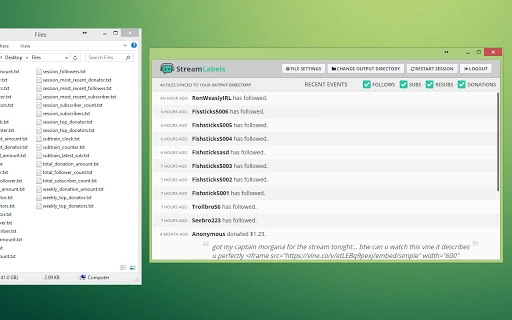
Stream Labels runs on your computer and updates a set of files that you can include into your stream (OBS, XSplit, etc) as text, or even as scrolling text (for example, your most recent donations).Most recent follower, subtrains, top donations, and more!# Recent Changes12/7/2016 (3.3.1)Prepping for standalone app.06/30/2016 (3.3.0)Added settings for the train/combo files so you can set the timer duration and show/hide when not active.06/29/2016 (3.2.0)Added "Top Donations" files for those who don't want their donations aggregated.06/07/2016 (3.1.4)- Attempting to prevent pesky browser caching to improve reliability05/05/2016 (3.1.3)- Fixed a bug with sub trains increasing the counter incorrectly04/13/2016 (3.1.2)- Improved analytics11/11/2015 (3.1.1)- Subscription files can now include resubs. A checkbox "Include Resubs" has been added to most subscription files.10/12/2015 (3.0.3)- Login is now stored locally, now you will only be asked to log in once until you log out.- Logging out now lets you log into another account instead of automatically logging you in to the previous account.10/06/2015 (3.0.2)- Links are now clickable in tip/donation messages.10/01/2015 (3.0.1)- Significant overhaul, the app now maintains a Recent Events list to help you stay up to date with your channel while you broadcast.

Guides & Tutorials for TwitchAlerts Stream Labels App for Chrome

How to install TwitchAlerts Stream Labels App for Chrome
  1. Click the Preview / Download button above.
  2. Once redirected, accept the terms and click Install.
  3. Wait for the TwitchAlerts Stream Labels App for Chrome download to finish on your device.
How to use TwitchAlerts Stream Labels App for Chrome

This software is primarily used for its core features described above. Open the app after installation to explore its capabilities.

User Reviews for TwitchAlerts Stream Labels App for Chrome 0

    No reviews found

Similar Apps


